The best Jellyfin app for Android TV depends on who is holding the remote. Moonfin and JellyWatch Player pack in the most features, Wholphin is the fastest and simplest, and the official Jellyfin app is the dependable default. If your home runs Plex as well, or you want everyone's profiles managed from one web dashboard, Media Center plays both servers in one app.
We make Media Center, so read our part of this comparison with that in mind. Every fact about the other apps comes from their own store listings, websites and GitHub pages, checked in October 2026, and we say plainly where they do something better.
Which Jellyfin app is best for Android TV? The short answer
- Best overall for one Jellyfin user: Moonfin — free, open source, one app for phone and TV, and the longest feature list.
- Best lean, TV-only client: Wholphin — fast, built for the remote, with a Plex-style layout for people coming from Plex.
- Safest default: the official Jellyfin for Android TV app, maintained by the Jellyfin project.
- Best for server admins who also watch: JellyWatch Player, which pairs with the JellyWatch server-monitoring app.
- Best for a household running Plex and Jellyfin: Media Center — both servers in one app, with profiles and kids' access managed from the web.
“Best” here means best fit. All five play a Jellyfin library well on a TV; they differ in who they are built for, how people sign in, and how much each one tries to do.
Jellyfin Android TV apps compared
| App | Android TV / phones | Plex support | Open source | Price as published | Profiles / kids | Sign-in | Notable strengths |
|---|---|---|---|---|---|---|---|
| Jellyfin for Android TV (official) | Android TV; phones use a separate official app | No | Yes (GPL 2.0) | Free, no in-app purchases | Jellyfin server users; parental limits set on the server | Server password or Quick Connect code | Maintained by the Jellyfin project; the reference client |
| Moonfin | Android TV and phones in one app (plus many other platforms) | No | Yes (GPL-2.0) | Free, no in-app purchases | Kids Mode locked with a PIN; blocked ratings | Server password or Quick Connect | Most features; offline downloads; merges several Jellyfin servers |
| Wholphin | Android TV and Fire TV; no phone app | No (its interface is Plex-inspired) | Yes (GPL-2.0) | Free, no in-app purchases | PIN or server login to switch profiles | Jellyfin server account | Fast, remote-first design; choice of ExoPlayer or MPV |
| JellyWatch Player | Android TV and phones | No | Not stated | Free download with in-app purchases | Kids profile with parental PIN; filtering from server policy | Server password or a code on your phone | Watch Party, Android TV home screen rows, admin dashboard |
| Media Center | Android TV, Google TV, phones and tablets in one app | Yes — Plex and Jellyfin at once | No | Plan set by the household administrator on the web | Household and kids profiles managed from a web dashboard; optional PIN | QR code scanned with your phone, or an emailed one-time code | One app for a household that runs Plex, Jellyfin or both |
“Price as published” is what each Google Play listing or website said in October 2026. Every app on this list needs a Jellyfin server you already run — none of them includes movies or shows of its own.
Is the official Jellyfin app for Android TV any good?
Jellyfin for Android TV is the client the Jellyfin project publishes itself, listed on jellyfin.org and on Google Play. It is free, open source under GPL 2.0, and has no in-app purchases. Its 0.19 release refreshed the interface, redesigned search with voice input, and improved how the player detects what your TV can play directly.
Sign-in is a Jellyfin username and password, or Quick Connect: the TV shows a six-character code that you approve from a device that is already signed in. Each person is a separate Jellyfin user, and limits for children — a maximum parental rating, or blocked tags — are set per user in the server's dashboard. It is a TV-only app; on a phone you install the separate official Jellyfin for Android app.
Pick it if you want the client that tracks the server most closely and do not mind a plainer look.
What is Moonfin, and is it worth it?
Moonfin is one of the Jellyfin clients people are searching for most in 2026. It is a free, open-source (GPL-2.0) Jellyfin client built from one codebase for Android phones and tablets, Android TV and Google TV, and several other platforms; on Android, one Google Play listing covers both the phone and the TV. Its README lists the longest feature list on this page: offline downloads, a library that merges several Jellyfin servers into one, themes and five detail-screen styles, Seerr requests, trickplay scrubbing, intro and credit skipping, and wide codec support including Dolby Vision and HDR10+.
For families it offers a Kids Mode that strips the app back and locks the way out with a PIN, plus blocked ratings that apply everywhere in the app. Sign-in supports Quick Connect. The trade-off is breadth: with that many options, some people find it busier than they want on a TV.
Pick it if you want the most capable free Jellyfin client and one app across your phone and TV.
What is Wholphin for Jellyfin?
Wholphin is a free, open-source (GPL-2.0) Android TV client for Jellyfin. It is not a fork of the official app — its interface and controls were written from scratch, inspired by Plex, for people moving from Plex to Jellyfin. Despite that inspiration, it plays Jellyfin servers only.
It is built around the remote: a customizable home screen, a navigation drawer, D-pad left/right to seek, and a choice of ExoPlayer or MPV for playback. Profile switches can be protected with a PIN or by requiring the server login. It requires Android 6 or Fire OS 6 or later and is on Google Play and the Amazon Appstore. There is no phone version. For a head-to-head, see Wholphin vs Jellyfin vs Moonfin.
Pick it if you want a fast, focused TV app and you watch on the TV only.
What is JellyWatch Player?
JellyWatch began as a phone app for monitoring and managing a Jellyfin server, and JellyWatch Player is its separate playback app for Android TV, Google TV, phones and tablets. Its site highlights Watch Party (synchronized viewing), Continue Watching on the Android TV home screen, a kids profile with a parental PIN, linked profiles that merge two Jellyfin servers, and an admin dashboard built into the player. You sign in with your server credentials or a code approved from your phone.
The download is free; the Google Play listing shows in-app purchases, and the site says the two JellyWatch apps share a Watch Pass subscription. We could not find a statement that the player is open source.
Pick it if you are the server admin and want playback and server monitoring from the same developer.
What about Findroid?
Findroid is a well-liked open-source Jellyfin app for Android phones and tablets, with offline downloads and a built-in MPV player. Its GitHub README lists Android TV under planned features, so it is not an Android TV option today. If you only watch on a phone, it is worth a look.
Media Center: a Plex and Jellyfin client in one app
Media Center is our app, and it takes a different angle. It is a player for the Plex and Jellyfin servers you already run, on Android TV, Google TV, Android phones and tablets from one Google Play download (Android 7.0 or later). Connect Plex, Jellyfin, or both at once — and choose which server serves movies and which serves series.

The household is managed from a web dashboard rather than from the TV. The administrator invites each person by email, and everyone gets their own profiles with their own Continue Watching and My List. Kids profiles see only titles with the content ratings you allow, and any profile can have an optional four-digit PIN. On the TV, signing in means scanning a QR code with your phone — no typing a server address or password with the remote — or entering a one-time code sent by email.
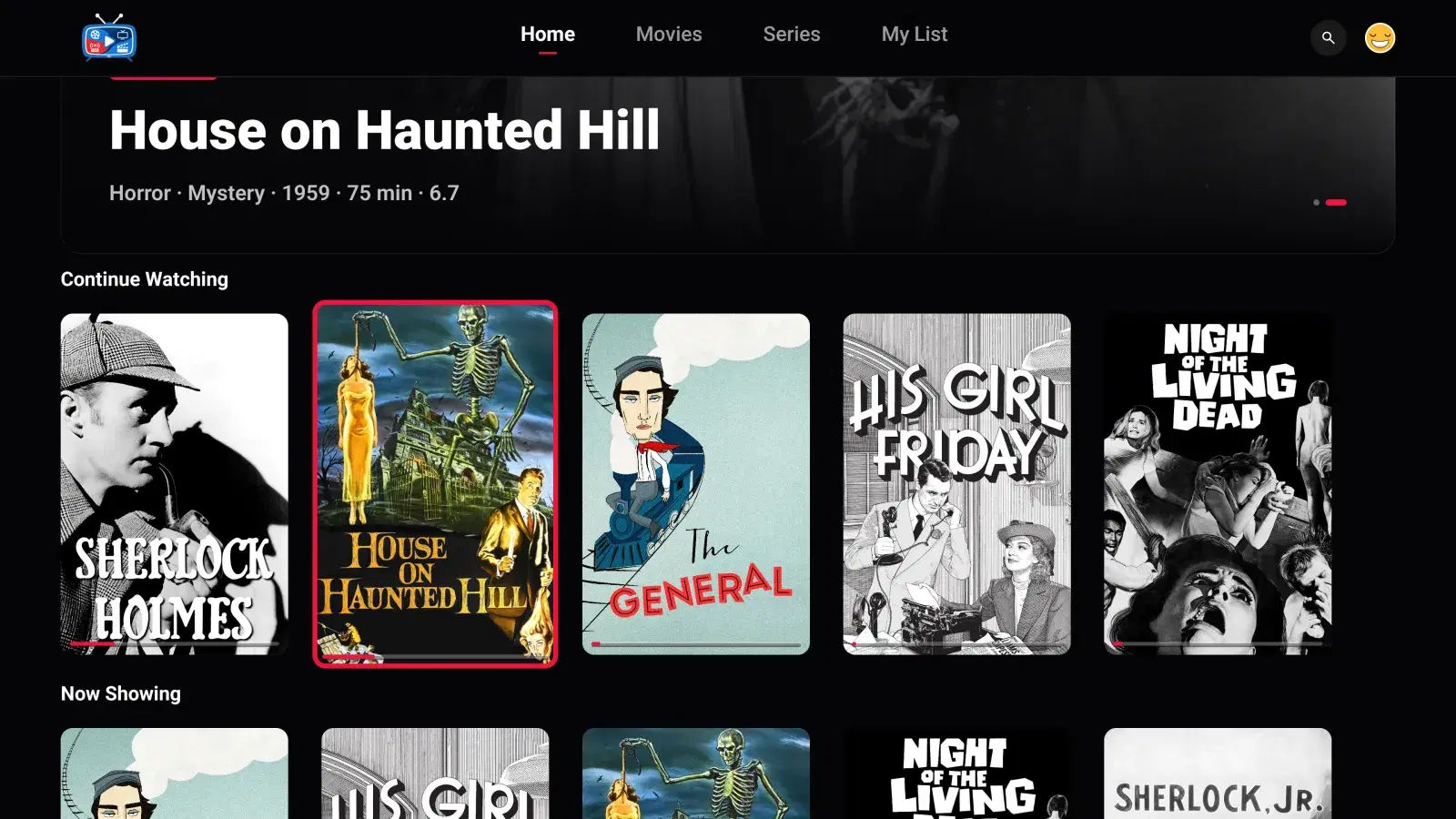
Video streams straight from your server over HTTPS, never through our servers, and the player offers audio and subtitle track selection, Skip Intro where intro markers exist, and a scrubber that shows the time remaining.
Where others are ahead: Media Center is not open source, has no offline downloads, and makes no claims about advanced video formats — if those matter most, Moonfin or JellyWatch Player is the better fit. Your server also needs an HTTPS address with a real certificate. The plan is set by the household administrator on the web, and the app is invitation-only, so there is no sign-up inside it.
Pick it if your household uses Plex and Jellyfin, or you want profiles and kids' access managed for everyone in one place. Setup is in how to watch Jellyfin on Android TV, and running both servers is covered in how to use Plex and Jellyfin together.
How to choose a Jellyfin client for Android TV
- Do you also run Plex? Every app here except Media Center plays Jellyfin only. If some of your library — or some of your family — lives on Plex, one app for both saves everyone switching apps.
- Who is watching? For one person, any of these works. For a household with children, compare how profiles and kids limits are set: on the Jellyfin server (official app), inside the app with a PIN (Moonfin, Wholphin, JellyWatch Player), or from a web dashboard (Media Center).
- TV only, or phone too? Wholphin and the official TV app are TV-only. Moonfin, JellyWatch Player and Media Center use one listing for phone and TV.
- How will people sign in? Typing a password with a remote is slow. Quick Connect, a phone-approved code, or a QR code all avoid it.
- Do you want open source? The official app, Moonfin and Wholphin are GPL licensed. JellyWatch Player and Media Center are not open source as far as their published pages state.
- Downloads and formats? If you need offline downloads or the widest codec list, look first at Moonfin and JellyWatch Player.
- Will it work away from home? That depends more on your server than on the app. A Jellyfin server reachable only at
http://192.168…works on your home network; to watch elsewhere — or to use an app that requires HTTPS, like Media Center — give it a public HTTPS address with a reverse proxy first.
The free, open-source apps cost nothing to try, so installing two and living with each for an evening is the quickest way to decide. To get Media Center on your TV, see Media Center for Android and Android TV.